THE SELF-SERVICE CLOUD PLATFORM
Set up your cloud.Let your team ship.
Give developers and their coding agents a repeatable path from repository to running service. Planton brings infrastructure, application delivery, and your team’s controls together—in your cloud.
AI-assisted infrastructure. Git-based delivery. Your team’s controls.
See Planton in action.
Proven infrastructure charts. Agents that work within your policies. Production approvals stay with your team.
01 / THE WHOLE PICTURE
One path from infrastructure to application.
Platform engineers establish the foundation. Developers use it to get their applications running.
- 01
Connect your cloud
Connect the cloud accounts your team already uses, with the access your deployment needs.
- 02
Create an environment
Define the network, runtime, and supporting services once. Reuse the architecture with each environment’s configuration.
- 03
Ship your application
Connect your repository and configure its delivery path. Follow each build and deployment across your environments.
02 / INFRASTRUCTURE
Your stack. Your cloud. One deployment workflow.
Connect managed services, Kubernetes workloads, and edge applications. A reusable infrastructure template—an Infra Chart—describes the resources and their dependencies. Planton deploys them in order.
An AI assistant for your product docs.
Connect your documents, a foundation model, and your application API. No Kubernetes cluster required.
Inspect the resources and their prerequisites together, from document storage to the application endpoint.
Explore This Stack
Explore the resources behind this illustrative architecture. Connections describe deployment prerequisites, not application traffic.
Select a resource to see its direct prerequisites. Supporting configuration is described in the inventory.
Read the Resource Inventory
Product Documents
- Product DocumentsAwsS3BucketPrerequisites: No resource prerequisite in this example
Vector Search
- Vector IndexAwsS3VectorBucketPrerequisites: No resource prerequisite in this example
Knowledge Base
- Knowledge Base RoleAwsIamRolePrerequisites: No resource prerequisite in this example
- Knowledge BaseAwsBedrockKnowledgeBasePrerequisites: Product Documents, Vector Index, Knowledge Base Role
Foundation Model
- Model ConfigurationAwsBedrockInferenceProfilePrerequisites: No resource prerequisite in this example
Response Guardrails
- Response GuardrailsAwsBedrockGuardrailPrerequisites: No resource prerequisite in this example
Assistant API
- Application ArtifactAwsS3BucketPrerequisites: No resource prerequisite in this example
- Application RoleAwsIamRolePrerequisites: No resource prerequisite in this example
- Assistant APIAwsLambdaPrerequisites: Application Role, Application Artifact, Knowledge Base, Model Configuration, Response GuardrailsKnowledge base, model, and guardrail connections are application configuration and explicit ordering; environment strings are not typed output references. Supply the application artifact and scoped permissions.
HTTPS Endpoint
- HTTPS EndpointAwsHttpApiGatewayPrerequisites: Assistant APIIncludes the route and configured client authorization. Lambda invocation permission is required.
- Prepare the building blocks.
Document storage, a vector index, model configuration, and guardrails can be provisioned independently.
- Connect the knowledge base.
Bedrock connects the document source and vector store. A separate ingestion step makes your documents searchable.
- Bring the configuration together.
The application needs the knowledge base, model, and guardrail configuration, plus permission to use them.
- Deploy your assistant API.
Lambda runs your application code, which retrieves context and calls the model with the configured response policies.
- Publish the HTTPS endpoint.
API Gateway connects to the Lambda function. Configure authorization for the clients that should reach it.
- One view of the connected stack.
Inspect the resources and their prerequisites together, from document storage to the application endpoint.
Illustrative architecture · deployment time compressed. Application code, data, and access configuration are supplied separately. The overview groups supporting resources; blue dots show deployment dependencies, not application traffic. Document ingestion is a separate step. The application invokes retrieval, the model, and its configured guardrail.
Your own AI inference stack.
Provision the cloud foundation and the workloads inside it. Choose your model and run it on your GPU capacity.
A gateway, TLS configuration, and route expose your application while the model and vector store stay internal.
Explore This Stack
Explore the resources behind this illustrative architecture. Connections describe deployment prerequisites, not application traffic.
Select a resource to see its direct prerequisites. Supporting configuration is described in the inventory.
Read the Resource Inventory
Cloud Network
- VPC NetworkGcpVpcNetworkPrerequisites: No resource prerequisite in this example
- SubnetGcpSubnetworkPrerequisites: VPC Network
GKE Cluster
- GKE ClusterGcpGkeClusterPrerequisites: VPC Network, Subnet
- General-Purpose NodesGcpGkeNodePoolPrerequisites: GKE Cluster
GPU Node Pool
- GPU Node PoolGcpGkeNodePoolPrerequisites: GKE Cluster
Model Server
- Model ServerKubernetesManifestPrerequisites: GPU Node Pool, Application NamespaceA custom vLLM manifest supplies GPU limits, scheduling, model access, storage, and readiness. Stable service names are explicit configuration, not typed outputs from this component.
Vector Search
- Vector SearchKubernetesQdrantPrerequisites: General-Purpose Nodes, Application Namespace
AI Application
- Application NamespaceKubernetesNamespacePrerequisites: GKE Cluster
- AI ApplicationKubernetesDeploymentPrerequisites: General-Purpose Nodes, Application Namespace, Model Server, Vector SearchModel and vector-store endpoints are application configuration; the example declares their ordering explicitly.
HTTPS Endpoint
- Gateway API DefinitionsKubernetesGatewayApiCrdsPrerequisites: GKE Cluster
- Gateway ControllerKubernetesIstioPrerequisites: General-Purpose Nodes, Gateway API Definitions
- Gateway ClassKubernetesGatewayClassPrerequisites: Gateway Controller
- Certificate ControllerKubernetesCertManagerPrerequisites: General-Purpose Nodes
- Certificate IssuerKubernetesClusterIssuerPrerequisites: Certificate Controller
- TLS CertificateKubernetesCertificatePrerequisites: Certificate Issuer, Application Namespace
- HTTPS GatewayKubernetesGatewayPrerequisites: Gateway Class, TLS Certificate, Application Namespace
- Application RouteKubernetesHttpRoutePrerequisites: HTTPS Gateway, AI ApplicationConfigure domain ownership and DNS for the gateway address. The illustration summarizes controller, certificate, and route dependencies.
- Start with your cloud network.
The VPC and subnet provide the network foundation for your cluster.
- Create the Kubernetes foundation.
GKE and general-purpose nodes provide the home for the application and its supporting services.
- Add capacity and vector search.
Provision a GPU pool for the model. Qdrant runs separately on general-purpose capacity.
- Deploy the model server.
Your vLLM workload uses the GPU pool, with the model, storage, and readiness configuration you provide.
- Connect your AI application.
Deploy your container with the model and vector-search endpoints. Your code owns retrieval and inference behavior.
- Publish the application route.
A gateway, TLS configuration, and route expose your application while the model and vector store stay internal.
Illustrative architecture · deployment time compressed. Application code, data, and access configuration are supplied separately. The overview groups supporting resources; blue dots show deployment dependencies, not application traffic. vLLM is a custom Kubernetes workload, not a dedicated catalog kind. Model access, weights, GPU quota, and application configuration are required.
An app that keeps work moving.
Serve orders, store application data, and process background jobs with managed Azure services.
Inspect the managed environment, database, messaging, and workloads together without managing a Kubernetes cluster.
Explore This Stack
Explore the resources behind this illustrative architecture. Connections describe deployment prerequisites, not application traffic.
Select a resource to see its direct prerequisites. Supporting configuration is described in the inventory.
Read the Resource Inventory
App Environment
- Resource GroupAzureResourceGroupPrerequisites: No resource prerequisite in this example
- Application LogsAzureLogAnalyticsWorkspacePrerequisites: Resource Group
- App EnvironmentAzureContainerAppEnvironmentPrerequisites: Resource Group, Application Logs
- Container ImagesAzureContainerRegistryPrerequisites: Resource Group
Orders Database
- Orders DatabaseAzurePostgresqlFlexibleServerPrerequisites: Resource GroupSupply database authentication, schema migrations, and appropriate network access.
Job Queue
- Messaging NamespaceAzureServiceBusNamespacePrerequisites: Resource Group
- Job QueueAzureServiceBusQueuePrerequisites: Messaging Namespace
Secrets & Access
- Application IdentityAzureUserAssignedIdentityPrerequisites: Resource Group
- Key VaultAzureKeyVaultPrerequisites: Resource Group
- Application SecretAzureKeyVaultSecretPrerequisites: Key VaultGrant the workload identity access to the vault, queue, and image registry as required.
Orders API
- Orders APIAzureContainerAppPrerequisites: App Environment, Orders Database, Job Queue, Application Identity, Application Secret, Container ImagesDatabase and queue connections are supplied through application configuration; these prerequisite edges summarize explicit composition.
Background Jobs
- Background JobsAzureContainerAppJobPrerequisites: App Environment, Orders Database, Job Queue, Application Identity, Application Secret, Container ImagesThe azure-servicebus event scaler and worker code need their queue configuration and credentials. The jobs do not depend on deploying the API.
- Prepare the application foundation.
Create the container environment and managed PostgreSQL database. Each has its own lifecycle.
- Prepare messaging and access.
Service Bus holds background work. Key Vault and managed identity support the application’s access configuration.
- Connect the required configuration.
Supply database access, queue settings, secrets, and scoped permissions before deploying the workloads.
- Deploy the orders API.
Your Container App serves requests and records orders using your application code and database schema.
- Deploy the background jobs.
Configure a Service Bus event trigger so Container Apps Jobs can run your worker code when work arrives.
- See the entire application stack.
Inspect the managed environment, database, messaging, and workloads together without managing a Kubernetes cluster.
Illustrative architecture · deployment time compressed. Application code, data, and access configuration are supplied separately. The overview groups supporting resources; blue dots show deployment dependencies, not application traffic.
Your application, at the edge.
Connect a file-sharing API to durable storage, application data, and asynchronous work.
The deployment starts with storage and the consumer. At runtime, requests flow from the API through the queue to the worker.
Explore This Stack
Explore the resources behind this illustrative architecture. Connections describe deployment prerequisites, not application traffic.
Select a resource to see its direct prerequisites. Supporting configuration is described in the inventory.
Read the Resource Inventory
File Storage
- File StorageCloudflareR2BucketPrerequisites: No resource prerequisite in this example
Application Data
- Application DataCloudflareD1DatabasePrerequisites: No resource prerequisite in this example
App Configuration
- App ConfigurationCloudflareKvNamespacePrerequisites: No resource prerequisite in this example
Background Worker
- Background WorkerCloudflareWorkerPrerequisites: File Storage, Application DataThe consumer binds its data stores, not the queue that depends on it. This avoids a circular deployment dependency.
Job Queue
- Job QueueCloudflareQueuePrerequisites: Background Worker
Edge API
- Domain ZoneCloudflareDnsZonePrerequisites: No resource prerequisite in this example
- Edge APICloudflareWorkerPrerequisites: File Storage, Application Data, App Configuration, Job Queue, Domain ZoneThe Worker owns its custom-domain configuration. Its queue binding makes it a producer; application code and D1 migrations are separate inputs.
- Give the application its data stores.
R2 holds files, D1 holds application records, and Workers KV holds configuration.
- Deploy the background consumer.
Bind the worker to the stores it needs. Your code handles metadata updates or other small asynchronous tasks.
- Connect the queue to its consumer.
The queue references the deployed background worker, so it knows which consumer should receive work.
- Pass the bindings to the API.
The producer needs its queue and data-store bindings before it can accept requests.
- Publish the edge application.
Deploy the API Worker with its bindings and configured domain. Your application code handles requests and enqueues work.
- Follow the dependencies, end to end.
The deployment starts with storage and the consumer. At runtime, requests flow from the API through the queue to the worker.
Illustrative architecture · deployment time compressed. Application code, data, and access configuration are supplied separately. The overview groups supporting resources; blue dots show deployment dependencies, not application traffic. Worker code and database migrations are supplied separately. KV holds configuration; D1 holds application records.
A SaaS application that scales with your customers.
Combine autoscaling application servers, managed PostgreSQL, and global asset delivery. Your application runs on virtual machines.
Inspect the network, servers, database, and delivery endpoints together. No Kubernetes cluster is required.
Explore This Stack
Explore the resources behind this illustrative architecture. Connections describe deployment prerequisites, not application traffic.
Select a resource to see its direct prerequisites. Supporting configuration is described in the inventory.
Read the Resource Inventory
Private Network
- Private NetworkDigitalOceanVpcPrerequisites: No resource prerequisite in this example
Customer Database
- Customer DatabaseDigitalOceanDatabaseClusterPrerequisites: Private Network
- Application Database UserDigitalOceanDatabaseUserPrerequisites: Customer Database
- Database Trusted SourcesDigitalOceanDatabaseFirewallPrerequisites: Customer DatabaseAllow the application server tag; credentials and schema remain application configuration.
Application Servers
- Server SSH KeyDigitalOceanSshKeyPrerequisites: No resource prerequisite in this example
- Server FirewallDigitalOceanFirewallPrerequisites: No resource prerequisite in this exampleTag-targeted rules follow the autoscaling fleet; permit only the configured application and administrative access.
- Application Server PoolDigitalOceanDropletAutoscalePoolPrerequisites: Private Network, Application Database User, Database Trusted Sources, Scoped Spaces Access, Server SSH Key, Server FirewallSupply the image, bootstrap, and application configuration. Data and credential connections are explicit configuration, not typed references in the pool schema. Use shared tags for load balancer and firewall membership.
HTTPS Endpoint
- Application DomainDigitalOceanDnsZonePrerequisites: No resource prerequisite in this example
- TLS CertificateDigitalOceanCertificatePrerequisites: Application DomainDomain delegation must already be configured for managed certificate issuance.
- HTTPS Load BalancerDigitalOceanLoadBalancerPrerequisites: Private Network, Application Server Pool, TLS CertificateTarget the server tag rather than ephemeral Droplet IDs. Server ordering is explicit; tag matching is not a pool-ID reference.
- Application DNS RecordDigitalOceanDnsRecordPrerequisites: Application Domain, HTTPS Load Balancer
Asset Storage
- Public Application AssetsDigitalOceanBucketPrerequisites: No resource prerequisite in this exampleOnly public application assets are served by the CDN. Uploading content is separate from provisioning.
- Scoped Spaces AccessDigitalOceanSpacesKeyPrerequisites: Public Application Assets
Global Asset Delivery
- Public Asset CDNDigitalOceanCdnPrerequisites: Public Application Assets
- Create the private network.
A VPC gives the application servers and database a shared private network.
- Prepare application data and assets.
Managed PostgreSQL stores customer data. Spaces holds the public assets your application publishes.
- Start the application servers.
The Droplet pool runs your image and bootstrap configuration. Keep persistent data outside the replaceable servers.
- Publish the HTTPS endpoint.
A load balancer terminates TLS and follows tagged servers as the pool scales. Configure health checks and network access.
- Deliver public assets globally.
The CDN serves public application assets from Spaces. Your application owns uploading and referencing those assets.
- See the connected SaaS foundation.
Inspect the network, servers, database, and delivery endpoints together. No Kubernetes cluster is required.
Illustrative architecture · deployment time compressed. Application code, data, and access configuration are supplied separately. The overview groups supporting resources; blue dots show deployment dependencies, not application traffic. Supply the application image and server bootstrap configuration. Load balancer membership follows server tags. The CDN serves public application assets, not private customer files.
INSIDE PLANTON
See how your infrastructure fits together.
Explore resource relationships, follow deployment status, and inspect the resources that need attention—all in the context of your architecture.
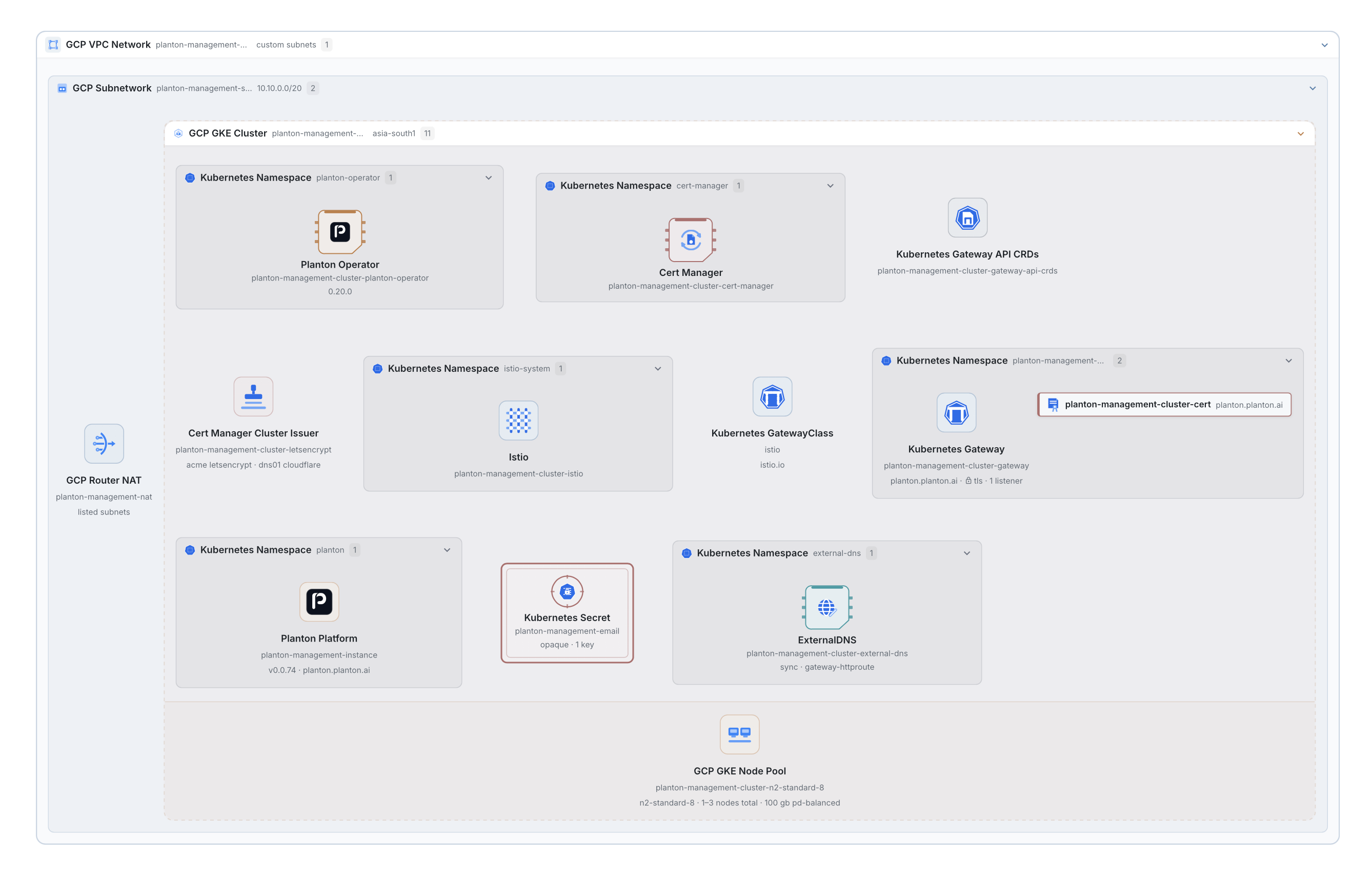
Dogfooding, in practice.This is our self-hosted Planton instance on GKE, which we use to manage Planton SaaS. Its cloud foundation and Kubernetes resources appear in one architecture view.
Open Full-Screen DiagramExplore the relationships behind your stack. In this capture, the network contains a subnet and GKE cluster, with workloads grouped by namespace.
Visible here: network, subnet, cluster, and namespace boundaries.03 / APPLICATION DELIVERY
From a Git push to a running service.
Give every Git push a repeatable path through build, development, and production—with approval where your team requires it.
One build. A controlled path to production.
Build once. Deploy with each environment’s configuration. Keep production behind a human decision.
A successful deployment records the artifact and the environment’s deployed resources. Inspect execution and verification observations separately; a deployment record is not a blanket health guarantee.
Read the Workflow
- Push a Change
A push that matches the service’s trigger rules starts a run. The source commit is captured.
- Build the Artifact
The configured build produces an artifact that the deployment stages can reference.
- Deploy to Development
Planton deploys the artifact with the configuration captured for development.
- Wait for a Person
Protected production waits for an authorized human decision. The assistant cannot approve this gate.
- Promote to Production
After approval, the same artifact deploys with the captured production configuration. Promotion does not rebuild it or copy development’s configuration.
- Keep the Delivery Record
A successful deployment records the artifact and the environment’s deployed resources. Inspect execution and verification observations separately; a deployment record is not a blanket health guarantee.
A successful delivery with a protected production environment. Repository, build, and environments are already configured. Verification observations are separate from deployment success and are not a universal promotion gate.
SELF-SERVICE DEVOPS / FROM YOUR EDITOR
Your coding agent can ship more than code.
Give the agent you already use a way to create cloud infrastructure, deploy your service, and inspect what happened—with Planton carrying the configuration, access controls, and deployment records.
From your editor to your cloud. And back.
“Create a development environment and deploy this service.”
The agent retrieves status and execution details to explain what happened and investigate failures with you.
Read the Workflow
- Ask from the editor you already use.
Describe what the service needs. Your repository gives the coding agent context for the request.
- Prepare a change you can inspect.
The agent uses Planton skills with the CLI or supported MCP tools to prepare infrastructure and deployment configuration.
- Keep the human decision with you.
Review the proposed configuration. Required deployment approvals belong to an authorized person; the agent cannot approve them.
- Let Planton execute within your controls.
Authorized requests go through Planton’s access and deployment controls, using your connected cloud and environment configuration.
- Run the work in your cloud.
Planton provisions the infrastructure and carries out service deployment. The agent can follow the run’s progress.
- Bring the result back into the conversation.
The agent retrieves status and execution details to explain what happened and investigate failures with you.
An illustrative workflow with a connected account, cloud, and configured approval rules. Agents use Planton skills with the CLI or supported MCP tools. Human approvals remain human decisions. The result represents status the agent retrieves; it is not a claim of automatic delivery into every editor.
Use Planton skills with the CLI in Cursor, Claude Code, or Codex. Supported agents can also connect through MCP. Connect your account and cloud before deploying; your team’s access and approval rules still apply.
Set Up Your Coding AgentCONTROL & OWNERSHIP
Self-service for your team. Control where it matters.
Define what your team can create, require approval where needed, and keep the record of every deployment.
Example Protected-Environment Workflow
- 1
Access
Within Your PermissionsRequests use the access of the person asking, including requests from coding agents.
- 2
Required Approval
Human DecisionProtected environments wait for the approvals your team configures.
- 3
Deployment Record
Configuration & OutcomeReturn to what ran, its approval history, and the execution result.
Choose Where Planton Runs
Hosted
A shared platform for your team.
Self-Hosted
Run Planton on your Kubernetes cluster.
Desktop
An individual local workspace.
Your environments, applications, and data.
Platform placement and workload placement are separate choices. Connection methods and capabilities vary by deployment.
Start with one environment or service. Supported resource kinds can be imported without recreating them; your infrastructure manifests remain readable and editable.
IN THEIR OWN WORDS
One customer. Both sides of the workflow.
The dot-env file generation for services feature in Planton's ServiceHub been super helpful for me. I can now update service configurations without having to ping Balaji every time. Even better, creating new services and deploying them to dev, staging, or prod is completely self-service. I don't need to wait for DevOps anymore.
Planton has dramatically improved my efficiency. I no longer have to deal with the grunt work of rewriting Terraform configurations between client projects. I can now manage multiple client environments simultaneously and provide a much better experience for all the developers I support.
A FEW THINGS YOU MAY BE WONDERING
Before we talk.
What does Planton replace or connect?
Planton connects cloud infrastructure setup, reusable environments, and application delivery. It can provide the build-and-deploy path for a service or work with repository-authored configuration and supported external CI workflows. Your cloud accounts and source repositories stay part of the workflow.
Can we use infrastructure we already have?
Yes, for supported resource kinds and import paths. Planton can track existing infrastructure and import its IaC state without recreating it. Tracking a resource is different from deploying it; we can use the demo to examine the right adoption path for your stack.
Where does Planton run?
Use hosted Planton, run the platform on your own Kubernetes cluster, or use a local Desktop instance. Desktop is an individual workspace. Shared deployments support team collaboration. Workload placement and credential options depend on your selected infrastructure and deployment setup.
How are cloud credentials handled?
Depending on the deployment, connections can use short-lived identity federation, credentials issued by Vault or OpenBAO, runner-side credentials, or managed secret references. Keyless federation requires an issuer the cloud can reach; it is not offered on a loopback-only Desktop instance.
What does the AI assistant do?
It helps compose infrastructure and investigate deployments using the context of the screen and the access of the person asking. It can read the relevant repository and propose changes through a pull request after review. Authorization and deployment approval requirements still apply.
What will we see in the demo?
A walkthrough of infrastructure setup, application delivery, and deployment controls, guided by your current stack and team’s needs. Share your details, then choose an available time in the calendar. A meeting is booked only after you confirm a slot.
YOUR NEXT ENVIRONMENT STARTS HERE
See how Planton would work for your team.
Bring your current stack. We’ll walk through infrastructure setup, application delivery, and the controls your team needs to ship with confidence.
A technical walkthrough, shaped around your team.